
The PaperOffice Insider Newsletter
We want to become friends

Highest possible discount offers.

Exclusive insider news

Free Bonus Upgrades

Highest possible discount offers.

Exclusive insider news

Free Bonus Upgrades

Friendship-Trust-Word of Honor
We will never share your email address with others, and each email includes a 1-click unsubscribe link.

Tesseract, ABBYY or AI? The Ultimate Comparison for Businesses 2025

Document digitization is no longer just an option for businesses today – it is business-critical and vital for survival. But between simple "text recognition" and true "document understanding" lie technological worlds.

While traditional OCR software like Tesseract has reliably extracted letters and characters for years, modern systems like PaperOffice are revolutionizing the entire industry through a fundamentally different approach: LLM-powered document processing with semantic intelligence and context-aware structure recognition.

The difference? True understanding instead of mere character recognition.

blog

The Three Generations of Document Recognition

Document digitization is now a decisive success factor – not only for increasing efficiency, but also for the intelligent use of business-relevant information. But which technology is really suitable for modern companies?

In this comprehensive guide, we examine the most important approaches to text recognition and show why AI-powered LLM solutions (Large Language Models) far surpass conventional methods.

Classic OCR is long outdated – it recognizes isolated characters, but understands neither the context nor the business value behind the data. Only intelligent systems with semantic understanding are capable today of extracting structured insights from documents.

Intelligent document analysis with Computer Vision

PaperOffice AI Smart System has specialized in exactly this most advanced generation and combines three revolutionary technologies: OCR + LLM for semantic text understanding, Intelligent Document Processing (IDP) for automated workflows and AI Vision for handwritten forms and OMR recognition. This integration enables 100% accuracy in document processing without templates or training.

Generation 1

Classic OCR (Tesseract, old ABBYY versions)

These systems work according to the pixel pattern matching principle. They scan documents pixel by pixel, compare recognized patterns with stored character templates and output plain text. The fundamental weakness: OCR systems have no understanding of meaning or context.

Tesseract 3.x was based on traditional computer vision algorithms and pattern recognition, while Tesseract 4 added an LSTM-based neural network, but still focuses primarily on character recognition. These systems typically achieve only 60-70% accuracy on complex documents.

Typical costs: Tesseract is open source (free), but requires significant development resources. Commercial solutions cost $500-2,000 per workstation plus manual post-processing due to low accuracy.

Classic OCR output example:
INVOICE
Company ABC Ltd
Invoice number 2024-0157
Date 03/15/2024
Amount $1,247.83

The problem: The software doesn't know what an "invoice number" is or that "$1,247.83" is a monetary amount. They are just recognized characters without meaning.

✗ Main problems:
  • Only 60-70% accuracy on complex documents
  • No semantic understanding
  • High manual post-processing effort
  • No handwriting recognition
Generation 2

Machine Learning OCR (modern ABBYY, Cloud providers)

Modern OCR systems like ABBYY FineReader and other cloud providers use Machine Learning and neural networks to achieve significantly better recognition rates. These systems are much more accurate than pure pattern matching approaches, but still work primarily at the character level.

Machine Learning OCR uses algorithms to interpret text through understanding of context and document structure, leading to significantly higher accuracy, especially with complex layouts and different fonts. Typical accuracy: 75-85% on structured documents.

Typical costs: ABBYY FineReader Server from $3,000-15,000 per server, cloud services like AWS Textract $0.0015 per page. With large volumes, monthly costs of several thousand dollars quickly arise.

Improvements over Gen 1:
  • Layout understanding through CNN-based algorithms
  • Better handwriting recognition with specialized models
  • Multi-language support without manual configuration
  • Automatic preprocessing (deskewing, noise reduction)
  • Cloud integration for continuous improvements
✗ Limitations:
  • High licensing costs ($3,000-15,000)
  • Still no semantic interpretation
  • Dependency on cloud providers
  • Limited handwriting recognition
Generation 3

LLM-powered Document Processing (PaperOffice IDP)

Here, Large Language Model technology comes into play. Instead of just recognizing characters, these systems understand the content and structure of documents. They don't just extract text, but deliver structured, categorized data with 100% accuracy.

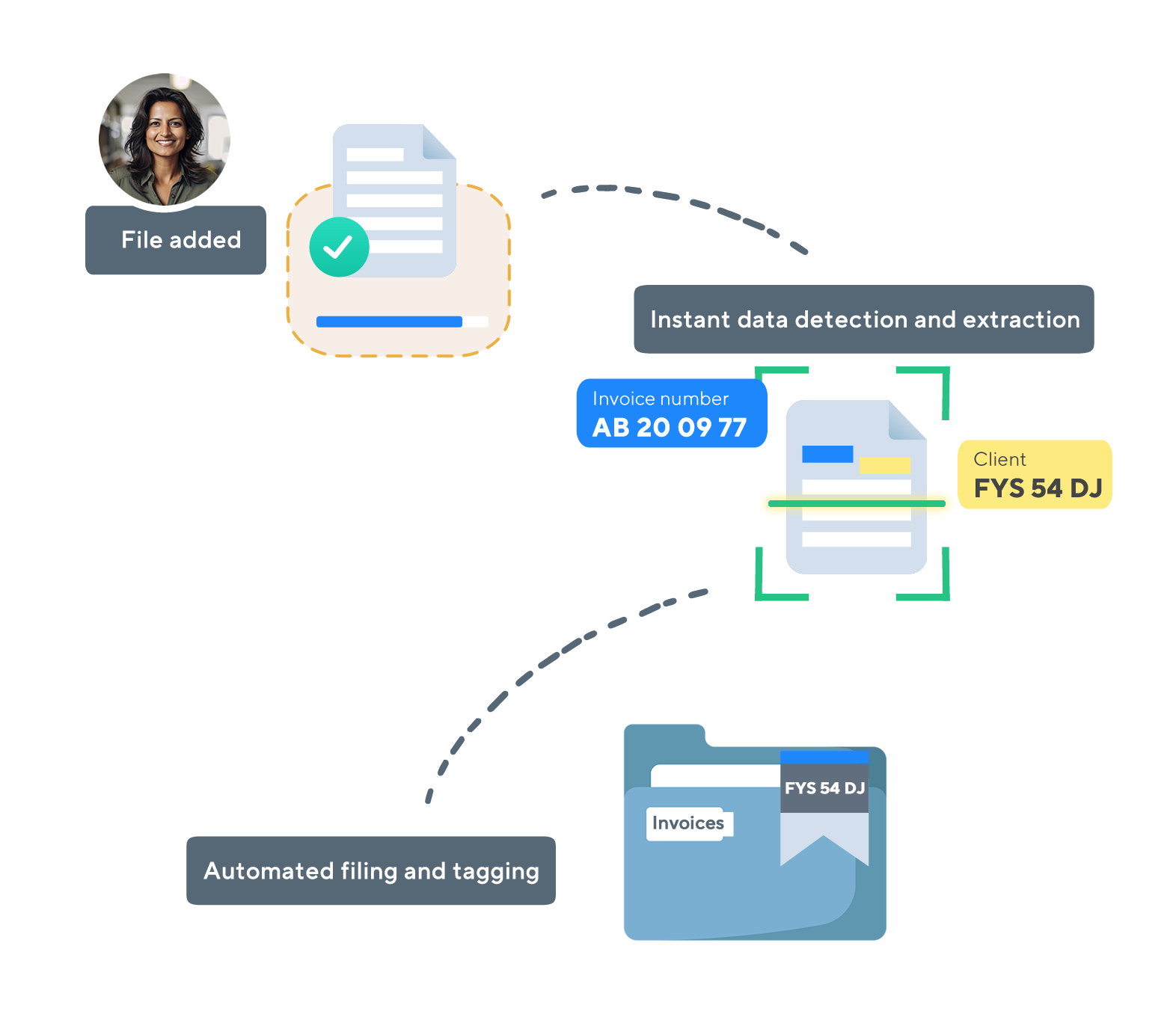
Semantic understanding means: The system not only recognizes "2024-0157", but understands that this is an invoice number. It automatically identifies invoice amounts, delivery addresses, item codes and can integrate this information directly into existing business processes.

AI Vision + LLM combines state-of-the-art image processing with linguistic understanding for fully automated document processing without templates or training.

Revolutionary advantages:
  • Semantic interpretation – understands meaning and context
  • Structured JSON output – directly usable business data
  • Automatic categorization by document type and content
  • Handwriting + OMR recognition without templates
  • Workflow integration – from recognition to archiving
  • Continuous learning through feedback loops
✓ Unique advantages:
  • 100% accuracy through semantic understanding
  • Easy operation simply through prompts
  • When needed - direct JSON output for systems
  • MCP integration
  • Handwriting without templates
  • Complete workflow automation
Investment:

Why Bounding Boxes Make the Difference

Bounding Boxes are a fundamental difference between simple text recognition and professional document processing. While conventional OCR systems only output text, modern systems remember the exact position of every recognized element. This positional data is crucial for quality assurance, traceability and automated workflows.

Intelligent document analysis with Computer Vision

Technically speaking, bounding boxes are rectangular coordinate frames around each recognized element in the document. But that's just the technical definition. In practice, they enable something much more valuable:

Interactive Documents

Click on an extracted value and instantly see where it appears in the original document. No searching, no uncertainty – direct visual connection.

Visual Validation

Extracted data is directly highlighted in the original – you see exactly what was recognized and can verify accuracy immediately.

Precise Extraction

Process only specific areas (e.g., only the table, not the header). Maximum efficiency through targeted data extraction.

Building Trust

Complete transparency between extracted data and original document. Every value is traceable and verifiable.

PaperOffice Approach: Both Worlds Intelligently Combined

PaperOffice doesn't offer "either OCR or AI", but both approaches – intelligently implemented:

Smart OCR

Intelligent OCR with LLM Power

  • Evolution of classic character recognition
  • LLM-powered text recognition with contextual understanding
  • Bounding Boxes for exact positioning
  • For simple but clean text recognition tasks
IDP Professional

Complete Document Intelligence

  • Handwriting, complex tables, stamps
  • Nested layouts and multi-language documents
  • 100% accuracy through true document understanding
  • Structured data extraction with semantic meaning

The Practical Difference in Daily Work

Scenario: Invoice Processing

Classic OCR (Tesseract)

Company ABC Ltd Sample Street 123 12345 Sample City
Invoice number 2024-0157 Date 03/15/2024
Item Office supplies Net $1,049.00
VAT $198.83 Total $1,247.83

Problem: Employee must read through text, extract relevant data and manually categorize. Time required: 8-12 minutes per invoice.

PaperOffice IDP Professional

{
  "document_type": "invoice",
  "vendor": {
    "name": "Company ABC Ltd",
    "address": "Sample Street 123, 12345 Sample City"
  },
  "invoice_number": "2024-0157",
  "invoice_date": "2024-03-15",
  "line_items": [{
    "description": "Office supplies",
    "net_amount": 1049.00
  }],
  "totals": {
    "net": 1049.00,
    "tax": 198.83,
    "gross": 1247.83,
    "currency": "USD"
  },
  "confidence": 100
}

Result: Direct integration into ERP system, visual validation possible. IDP time required: under 10 seconds per invoice.

The Cost Truth: What You Really Pay

Tesseract (Open Source)

  • Software: $0
  • Post-processing: 8-12 min/document
  • For 1000 invoices/month:
    Working time: 167h × $25/h = $4,175/month
Hidden annual costs: $50,100

ABBYY FlexiCapture

  • Price: 5-15 cents/page
  • Setup + License: $15,000-50,000
  • For 10,000 pages/month:
    $500-1,500/month + base costs
Annual costs: $35,000-80,000

Where LLM-powered Systems Show Their Strengths

Accuracy Benchmark: Hard Numbers

Recognition accuracy on real business documents:

  • Tesseract 4.0: 89-94% (clean scans), 65-80% (difficult documents)
  • ABBYY FineReader: 96-98% (with training), 85-92% (out-of-box)
  • LLM-powered systems: 99.7% (structured extraction with contextual understanding)

Understanding Handwriting

While classic OCR fails with handwritten notes, LLM technology interprets even illegible handwriting through context. If something that looks like "15.3" appears next to "Date", the system recognizes a date.

Contextual Understanding

An amount of "1,247.83" is not only recognized as a number, but categorized as an invoice total. The system understands relationships between different document elements.

Multilingual Documents

Automatic language detection and semantic translation enable processing of international documents without separate configuration.

Complex Layouts

Nested tables, multi-column layouts and irregular structures are correctly interpreted and output in structured format through AI analysis.

Accuracy Benchmark: Hard Numbers

Recognition accuracy on real business documents:

  • Tesseract 4.0: 89-94% (clean scans), 65-80% (difficult documents)
  • ABBYY FineReader: 96-98% (with training), 85-92% (out-of-box)
  • LLM-powered systems: 99.7% (structured extraction with contextual understanding)
PaperOffice IDP with AI Vision

The Most Common Misconceptions in Technology Selection

Misconception 1: "Open Source OCR is cheaper"

Example: Tesseract costs $0, but with 1000 documents/month, $50,100/year in labor costs arise for manual post-processing. ABBYY costs $35,000-80,000/year - software costs are just the tip of the iceberg.

Misconception 2: "Our documents are too special"

LLM-powered systems learn new document types. What previously required custom programming now works through training with just a few sample documents.

Misconception 3: "100% accuracy is impossible"

With proper LLM implementation and contextual understanding, 100% accuracy in data extraction is actually achievable - especially with structured business documents.

Misconception 4: "This is too complex for us"

Modern AI solutions are often easier to use than yesterday's OCR software. The complexity has shifted from usage to development.

Technical Reality: How the Systems Work

Classic OCR (Tesseract Approach)

Input: Scanned document

Image preprocessing (noise removal)

Pixel pattern recognition (template matching)

Character classification

Output: Unstructured text

LLM-powered Processing (PaperOffice Approach)

Input: Document (any format)

Multi-modal analysis (text + layout + structure)

LLM-based document type classification

Semantic entity recognition

Context-aware data extraction

Quality control and bounding box generation

Output: Structured data with 100% accuracy

Decision Guide: What Do You Really Need?

Intelligent OCR -> PaperOffice OCR Max, sufficient if:

  • Mainly printed, clean documents
  • Simple layouts without complex structures
  • Text recognition sufficient, no data extraction needed

PaperOffice IDP Professional, necessary if:

  • Handwriting, stamps, complex tables
  • Various document types and languages
  • Structured data extraction required
  • Integration into ERP/CRM systems planned
  • Error-free processing critical

Hybrid Approach (PaperOffice OCR+LLM+IDP) optimal if:

  • Mixed document types
  • Different quality requirements
  • Gradual digitization planned
  • Flexibility in budget and scaling

Practical Test: Try It Yourself

Instead of theoretical discussions: Test 100-200 of your typical documents with different systems. Take real documents - the mix of good and bad scans, different layouts and languages.

Measure:
  • Extraction accuracy
  • Time for post-processing
  • Integration capability with your systems
  • Scalability with increasing volume

The numbers speak clearly: Companies using LLM-powered document processing reduce manual work by 85-95% while achieving higher accuracy.

Conclusion: Make Intelligent Decisions Instead of Following Trends

The technology landscape has fundamentally changed. While classic OCR like Tesseract is still sufficient for very simple use cases, LLM-powered systems like PaperOffice offer true document intelligence.

The decisive difference:

You don't have to choose between OCR and AI. PaperOffice AI Smart Suite offers both - intelligent OCR+LLM for simple cases and complete IDP solutions for complex requirements.